MYVSS is the digital platform by Versilia Supply Service, designed to give you a complete and up-to-date overview of all your activity: quotations, orders, shipments and documents.
Everything in one dashboard, continuously updated in real time by your dedicated sales representative.
Access your dashboard in seconds
1
Go to versiliasupplyservice.com and click on MYVSS
2
Log in to your personal dashboard
3
Access your personal dashboard
The MYVSS portal is available exclusively to registered VSS clients.
If you do not have an account yet, request access here and we will contact you with your login credentials.
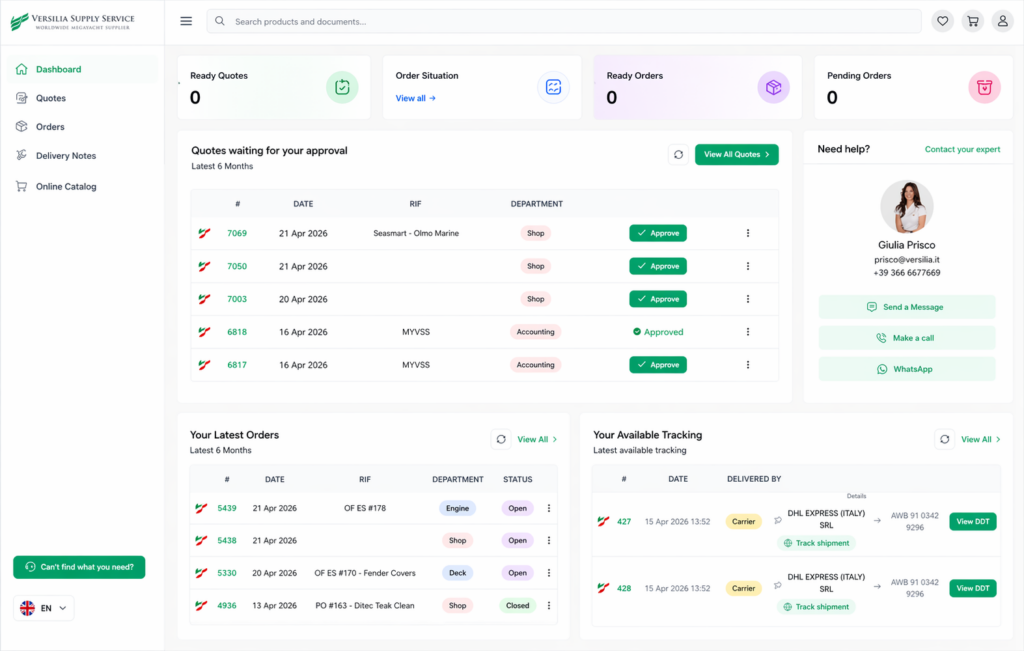
The four cards at the top are quick counters designed to provide an immediate overviewof operational activity over the last 60 days, including quotations ready for approval and the status of orders, with a clear product-by-product breakdown showing whether each item is completed or pending.
In addition, from this section you can also view:
Quotes to Approve: preview of the most recent quotations with status updates and quick actions
Order History: summary of recent orders with current progress status
Tracking: latest shipment updates with carrier details and tracking link
Global Search: search products and documents directly from the header
Quotes
In this section, you can find all quotations issued by your dedicated sales representative. You can view them, download them as PDF files and, when ready, approve them directly online.
QUOTE STATUS
In progress
The quote is currently being processed by VSS. No action required.
Ready
The quote is ready for review. You can approve it or download it.
Ordered
Quote approved and converted into an order. Click the badge to view the order.
Approve a Quote
When a quote is marked as Ready, the green Approve button will appear. By clicking it, a panel will open where you can review and confirm the quotation.
Once confirmed, the quote will be marked as Approved and the order will be automatically created in the system.
By clicking the three vertical dots under Actions, you can also download the quote as a PDF document or view the full quotation details, including all listed products.
Quote Details
Date, department, reference PO number, and product list.
Sales Information
Name, email, and phone number of your dedicated VSS sales representative.
More Actions
Download PDF.
Viev Quote.
Order
The Orders section displays the complete list of all your orders, including their current status and linked delivery notes. You can also download the PDF file with the full product details directly from this area.
Order Status
Open
Order currently being processed by VSS.
Shipped
Order completed and delivered.
Shipment Status by Line Item
Within the order details, each product line displays three colored circular badges indicating quantities:
12
Shipped
Delivered quantity (Shipped Quantity)
4
Ready
Ready to be shipped (Quantity to Ship)
2
Back Order
Awaiting supplier availability
The badges only display quantities greater than zero, allowing you to quickly view the progress status of each line item.
Delivery Notes
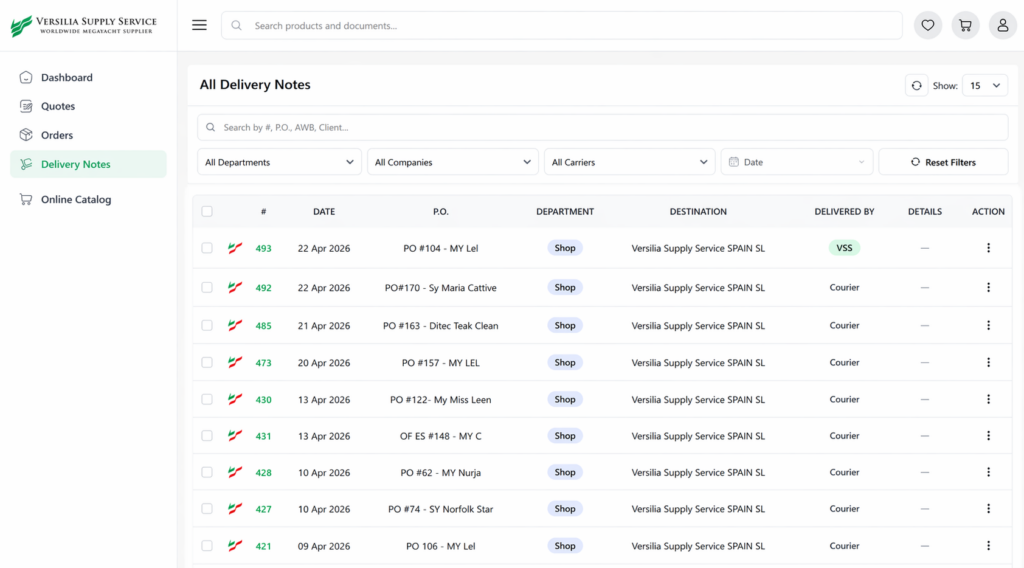
Delivery Notes (DDTs) record every shipment. The Tracking module provides real-time delivery status updates with courier information. In My Delivery Notes, you can find the list of all delivery notes related to received shipments. For each delivery note, the following details are displayed:
Number: identification number of the delivery note
Date: document creation date
Reference (RIF): related order number
Carrier: courier responsible for the shipment
AWB: airway bill / tracking number useful for shipment tracking



 Download PDF.
 Viev Quote.